Website Builders vs Custom Code: Which Is Right for Your Business in 2026?

Choosing between website builders, custom development, or a content management system shapes everything about your digital presence. Each approach serves different business needs, budgets, and growth plans. The right choice depends on your specific goals and technical requirements.
For more detail, see our guide on choosing a content management system.
The web has transformed dramatically since the 1990s. Early sites like Amazon’s original homepage were basic text-heavy pages with minimal graphics. Compare that to modern websites featuring complex layouts, interactive elements, and sophisticated user experiences. Business owners now have multiple paths to get online, each with distinct advantages and limitations.
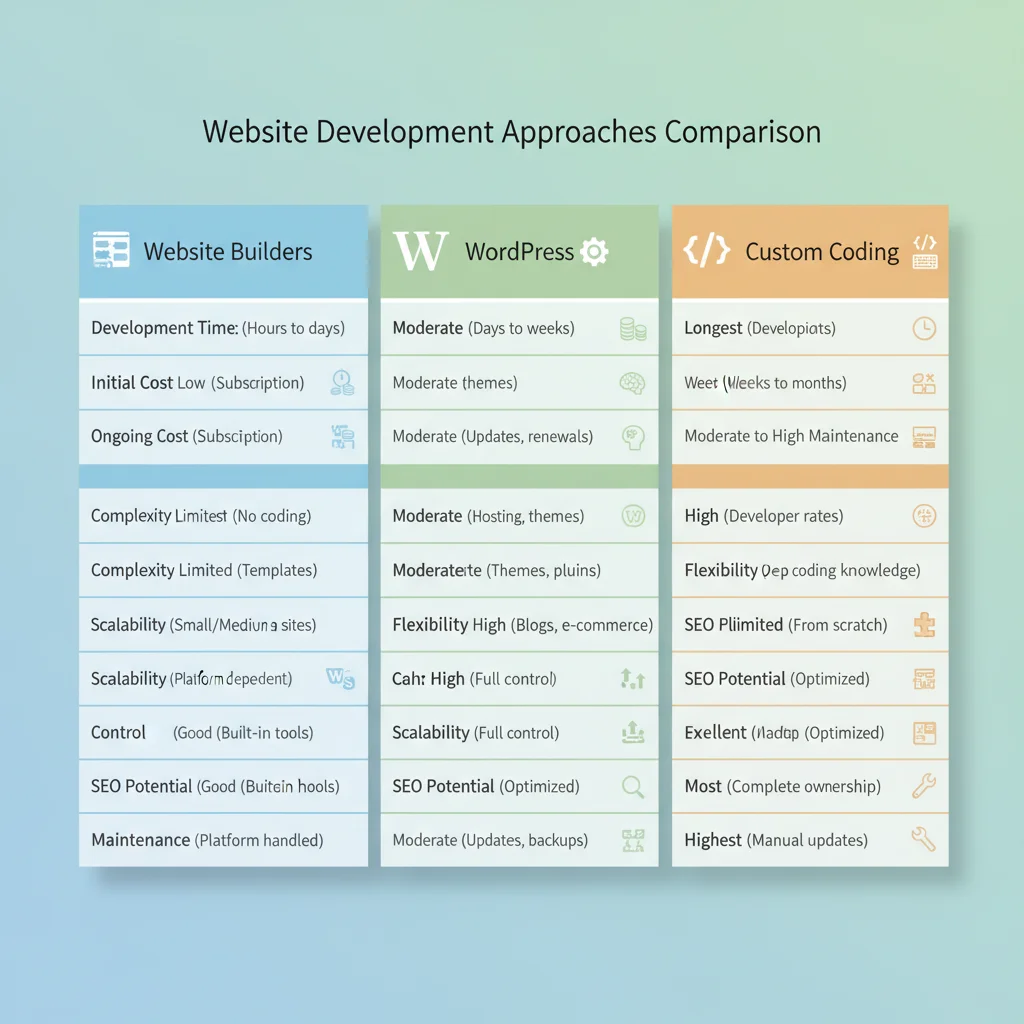
Website Builders: The Quick Start Solution
Website builders like Weebly, Wix, and Squarespace promise professional websites without coding knowledge. These WYSIWYG (what you see is what you get) platforms offer drag-and-drop functionality with pre-built templates designed for various industries.
Website Builder Advantages
Zero technical expertise required: You can build a functional website in hours, not weeks. The drag-and-drop interface makes arranging content as simple as moving elements around a page.
Professional templates included: Most builders offer hundreds of industry-specific templates. Since web usability principles show visitors decide within seconds whether to stay, having a professional design matters immensely.
Step-by-step guidance: Setup wizards walk you through domain selection, template customisation, and content upload. This structured approach removes guesswork from the website creation process.
Affordable pricing: Most builders cost $10-25 monthly, including hosting and basic features. For small businesses testing online presence, this represents minimal financial risk.
Website Builder Limitations
Despite their appeal, website builders impose significant restrictions that become problematic as businesses grow.
Code export restrictions: Most builders lock you into their platform. You cannot export your site’s code or migrate to another system without rebuilding everything. This creates long-term vendor dependence.
Storage and bandwidth limits: Even paid plans restrict storage space and monthly traffic. High-traffic sites quickly hit these limits, requiring expensive upgrades or causing performance issues.
Template uniformity: Your chosen template is used by thousands of other sites. Creating unique brand identity becomes nearly impossible when your design matches countless competitors.
Feature restrictions: Advanced functionality like custom forms, member areas, or complex e-commerce features often require premium plans or simply aren’t available.
Transaction fees: E-commerce functionality includes additional fees. Weebly charges 3% per transaction on lower-tier plans, which compounds quickly for active online stores.
Custom Development: Maximum Control
Hard coding involves building websites from scratch using HTML, CSS, and JavaScript. Every element is custom-created for your specific requirements without pre-built templates or platform restrictions.
Custom Development Benefits
Complete design freedom: Every visual element reflects your brand identity. No template restrictions limit your creative vision or force compromises in user experience design.
Optimised performance: Custom sites contain only necessary code, resulting in faster loading times. Website speed directly impacts user experience and search engine rankings.
Enhanced security: Custom sites avoid common vulnerabilities found in popular platforms. Unique codebases are less attractive targets for automated attacks that exploit known platform weaknesses.
Scalability: Custom development accommodates growth without platform limitations. You can add features, increase capacity, or integrate complex systems as business needs evolve.
Custom Development Drawbacks
High initial costs: Custom development requires significant upfront investment. Professional developers charge $75-150 per hour, and complex sites take weeks or months to complete.
Extended timelines: Building from scratch takes considerably longer than using templates. Simple business sites require 4-8 weeks, while complex applications may need several months.
Ongoing maintenance responsibility: Updates, security patches, and feature additions require developer assistance. This creates ongoing costs and potential delays for urgent changes.
Technical expertise dependency: Making even minor changes requires coding knowledge or professional help. Business owners cannot independently update content or modify layouts.
Content Management Systems: The Middle Ground
Content management systems like WordPress bridge the gap between website builders and custom development. They provide user-friendly interfaces while maintaining flexibility for advanced customisation. WordPress powers over 40% of all websites, demonstrating its versatility across different business types.
WordPress Advantages
User-friendly content management: Adding pages, blog posts, or media files requires no coding knowledge. The intuitive dashboard makes content updates straightforward for non-technical users.
Theme flexibility: Thousands of professional themes are available, both free and premium. Custom theme development allows unique designs while maintaining CMS functionality.
Plugin ecosystem: Over 60,000 plugins extend WordPress functionality. Need contact forms, SEO tools, or e-commerce features? There’s likely a plugin solution available. Our guide to essential WordPress plugins covers the most valuable options.
SEO capabilities: WordPress includes built-in SEO features and supports advanced plugins like Yoast or RankMath. Proper optimisation helps sites rank well in search results, which is essential for getting found online.
Cost effectiveness: WordPress itself is free. Total costs include hosting ($10-30/month), premium themes ($50-200), and professional plugins ($50-300/year). This remains significantly cheaper than custom development.
WordPress Considerations
Learning curve: WordPress requires more technical understanding than website builders. Users need to learn theme customisation, plugin management, and basic troubleshooting skills.
Maintenance requirements: Regular updates for WordPress core, themes, and plugins are necessary for security and functionality. Neglecting updates creates vulnerability risks.
Plugin conflicts: Some plugins don’t work well together, causing functionality issues or site crashes. Careful plugin selection and testing prevent most problems.
Security responsibility: While WordPress is secure when properly maintained, it requires ongoing attention to security best practices and timely updates.

Making the Right Choice for Your Business
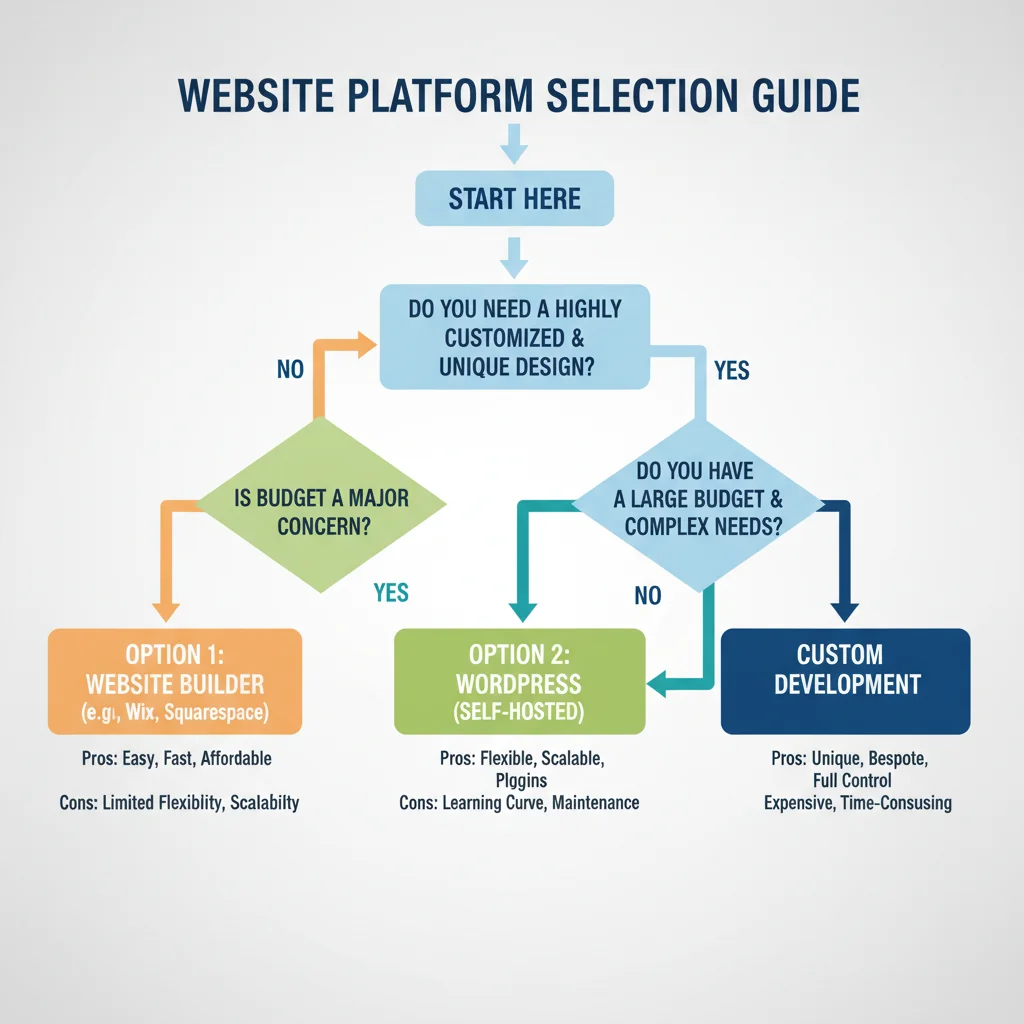
The best platform depends on your specific business requirements, technical comfort level, and growth plans. Consider these decision factors:
Choose Website Builders If:
- You need a basic online presence quickly
- Technical skills are limited or non-existent
- Budget is under $500 for the first year
- Content will be relatively static
- Unique design isn’t a priority
Choose Custom Development If:
- Unique design and functionality are essential
- Budget exceeds $10,000 for initial development
- Complex integrations or custom features are needed
- Maximum performance and security are priorities
- You have ongoing development resources
Choose WordPress If:
- You want flexibility without high costs
- Regular content updates are planned
- SEO performance matters significantly
- Budget allows for $1,000-5,000 initial investment
- Growth and additional features are anticipated
Professional Guidance Makes the Difference
Choosing the wrong platform creates problems that compound over time. Website builders may seem appealing initially but become restrictive as businesses grow. Custom development provides ultimate flexibility but requires substantial investment and ongoing technical support.
At PWD, we’ve guided hundreds of Australian businesses through this decision process. Our web design team in Perth specialises in building custom WordPress sites that scale with your growth. Our experience shows that most growing businesses benefit from WordPress or custom solutions rather than builder platforms. The initial investment pays dividends through better performance, SEO results, and long-term flexibility.
Consider your three-year business plan when making this choice. What seems adequate today may severely limit your options tomorrow. Our team can assess your specific requirements and recommend the optimal approach for your goals and budget.
The right website platform becomes an asset that grows with your business rather than a limitation that holds it back.
Frequently Asked Questions
How much does each website option typically cost?
Website builders cost $10-25 monthly. WordPress sites range from $1,000-5,000 initially plus hosting fees. Custom development starts around $10,000 and can exceed $50,000 for complex sites.
Can I migrate from a website builder to WordPress later?
Migration is possible but challenging since most builders don’t export clean code. You’ll likely need to rebuild the site, though content can usually be transferred manually.
Which option is best for SEO performance?
WordPress and custom sites typically perform better for SEO due to cleaner code, faster loading speeds, and greater optimisation control. Website builders have improved but remain more limited.
How long does each approach take to launch?
Website builders can go live within days. WordPress sites typically take 2-6 weeks depending on customisation. Custom development requires 6-16 weeks for most business sites.
Do I need technical skills for WordPress?
Basic WordPress use requires minimal technical knowledge, similar to using email or social media. Advanced customisation benefits from technical skills or professional assistance.